
GuestKey
Electronic locks, readers, RFID cards and energy-saving card holders, with management software that lives in a web page: guestkey.cloud. For hotels, B&Bs, holiday homes and short-term rentals.

The management software needs no installation
This opens guestkey.cloud da computer, tablet o telefono e si entra con le credenziali della struttura. Le camere stanno in una gerarchia di tre livelli — proprietà, edificio, piano — e a una struttura piccola basta la sola proprietà.
Each room is a card
The color shows the status: free or occupied, with the name of whoever is staying there. Next to it, the remaining charge of the lock and an icon showing whether it is connected to the gateway. Remote opening works only when the lock is online; codes and cards work regardless.
What you can do from the management software
One booking, one code
Si compila un modulo solo — nome, contatti, check-in e check-out — e il codice di quella camera viene generato insieme alla prenotazione.
Fourteen code types
Single-use for the first entry, valid for the whole stay, permanent for owners and cleaning staff, or by time slot: every day, weekdays only, weekends only, or one specific day of the week.
RFID cards
Timed for guests, permanent for staff. They align with the booking dates with a single command, and a lost card is blocked immediately.
Access log
Who opened, when and how: remotely, from the app, with the code, with the card or from the inside handle. Rejected attempts are shown too.
Entry routes
Building door, gate, entrance door, room: they are lined up in the order the guest passes through them, and each step gets its own code.
Email and WhatsApp
Two templates per property, with placeholders that become the name, room, code and times when the message is sent. The message goes out by email or via WhatsApp.
Home automation
I dispositivi Tuya e Smart Life registrati nel gestionale — interruttori, tasche energy saver, apriporta, tapparelle, termometri, sensori porta — si comandano dalla stessa pagina e si usano dentro i percorsi.
Temporary codes
For a supplier, a maintenance technician or a guest without a booking: a link that opens the chosen door openers only within the specified time window.
What’s in the range
Locks, readers and cards are sold in our online store, porteitaliane.com. Here is what each product family is for.
Electronic handles and RFID smart locks
The lock is inside the handle: it opens with a code, a card or remotely. It goes on the room door in place of the existing handle.
Wall readers
When the lock can’t be touched: the reader sits on the wall next to the door and controls the electric strike. It’s the way to go for building doors and security doors.
Professional access control systems
Readers with keypad, badges and remote management for shared entrances: building door, gate, gym, laundry, breakfast room.
RFID cards and badges
The cards you give to guests and staff. Timed for those who sleep there, permanent for those who work there, and can be blocked from the management software if one is lost.
Energy saver card holders
The holder at the room entrance that supplies power only when the card is inside. In the timed version, the power stays on for a while after the guest leaves.
Electric strikes
The part that opens the door when the command arrives. For interior wooden doors and for entrances.
Smart-managed intercoms
Modules that bring the intercom you already have into the management software, so the building door can also be opened from your phone.
Management software subscriptions
Access to guestkey.cloud. You buy the locks once and they remain yours: the subscription covers the management software, not the hardware.
Door and home automation from the same factory
Chi vende il software non fa le porte. Chi fa le porte non fa il software. Noi facciamo tutte e due le cose nello stesso stabilimento, a Capo d’Orlando, e questa non è una frase da dépliant: vuol dire che la porta arriva già fresata, con la serratura montata e configurata, e in cantiere nessuno deve prendere in mano una fresa.
It also means there is only one supplier. If a lock doesn’t open, there’s no door manufacturer saying “it’s the hardware” and hardware manufacturer saying “it’s the door”. There’s one number to call, and it’s ours.
What if the doors are already in place?
Then we work from the doors you have. You don’t choose an electronic lock from a photo: you choose it based on the door it has to go on. These are the five measurements we always ask for, and you can take them in two minutes with a tape measure.
- 1
Center distance
The distance between the center of the handle and the center of the cylinder. On Italian interior doors usually 85 or 90 mm, on security doors often 92 mm.
- 2
Backset
How deep the lock is: the distance between the edge of the faceplate and the center of the handle spindle hole. It’s the measurement that decides whether the electronic handle will fit.
- 3
Leaf thickness
Electronic handles accept a range of thicknesses. A 40 mm door and an 80 mm security door don’t take the same part.
- 4
Cylinder
European, oval, double-bit — and how far it projects from the plate. On an old door with a double-bit lock, it’s a completely different story.
- 5
Door handing
Right or left, opening inward or outward. You look at it from outside, with the door opening toward you.
Send them to info@fipporte.com with a photo of the door open on the lock side: we’ll reply telling you which part fits, or whether it’s better to switch to the wall reader, which doesn’t touch the lock at all.
The manual, chapter by chapter
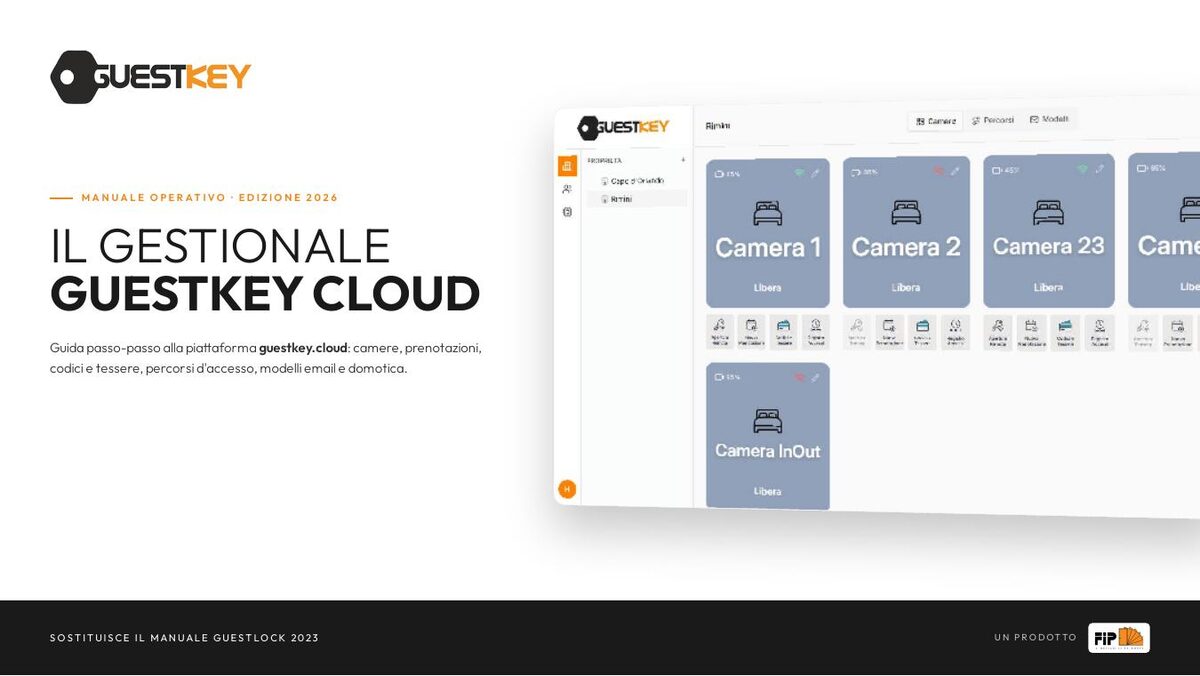
Fifteen chapters and twenty-one screens of the management software, to read here on the site: tap a number on the screen and the explanation lights up beside it. From the first booking to email templates, from routes to home automation devices. It replaces the 2023 Guestlock manual.
Open the manual Or download the PDF (2.7 MB) to print it.The questions we get asked
Do I need to install a program on my computer?
No. The management software is a web page: you open guestkey.cloud from a computer, tablet or phone and log in with your property’s credentials. There’s nothing to install and nothing to update.
If the internet goes down, are guests locked out?
No. Codes and cards work on the lock even without a network: the lock recognizes them by itself. What needs the connection is remote opening, which stays grayed out in the management software until the lock is linked to the gateway.
How many code types can you create?
Fourteen. Single-use for the first entry, valid for the whole stay, permanent for owners and cleaning staff, and then the repeating time slots: every day, weekdays only, weekends only, or one specific day of the week. There’s also a service code that erases the codes stored on the lock.
Does the guest need to download an app?
Not to get in: the code reaches them by email or via WhatsApp and they type it on the keypad, or they swipe the card on the reader. The app remains an extra option, and the access log distinguishes openings made that way from the others.
Can I give a supplier a code without making a booking?
Yes. You generate a temporary access code: it’s a link that opens only the chosen door openers, and only within the specified time window. It’s for the maintenance technician, for one-off cleaning, for deliveries.
How do I know who entered the room?
The access log shows who opened, when and how: remotely, from the app, with the code, with the card or from the inside handle. Rejected attempts are shown too.
A guest has lost their card. What do I do?
You block it from the management software, immediately, without touching the lock and without changing anyone else’s code. Guest cards align with the booking dates automatically.
Can I also control the building door and the gate, not just the room?
Yes. In the management software you build the route: building door, gate, entrance door, room, lined up in the order the guest passes through them. Each step gets its own code, and all the codes go in the same email.
Are the locks bought or rented?
Bought. They remain yours, and they stay on the door even if one day you no longer need the management software. The annual subscription covers guestkey.cloud, not the hardware.
How do I know when to change the batteries?
The management software shows the remaining charge for every room, on the room card. The manual recommends replacing the batteries before the charge drops below twenty percent.
Will it work on the doors I already have?
If we make the door, the question doesn’t arise: it arrives already machined, with the lock fitted and configured. If the doors are already in place, it depends on the door, and the answer comes from measurements, not guesswork: center distance, backset, leaf thickness, cylinder type and handing. Send them to us and we’ll tell you which part fits, or whether the wall reader is the better choice, since it doesn’t touch the lock at all.
What if the door is a certified fire door?
Then the first thing to check is the door’s technical file. A REI door is certified as a whole: leaf, frame, hinges, lock. Replacing the lock without checking what that certification allows is the quickest way to lose it. Write to us before ordering: this has been our trade since before electronic locks existed.
Where to buy
Locks, readers, cards and management software subscriptions are in our online store, porteitaliane.com.
For a full installation
If you have many rooms, or need to work out which lock suits the doors you already have, write to us: we’ll look at doors, entrances and routes together.